Coding Examples
A Collection Of
Things I'm Building.
A growing collection of coding examples and projects developed throughout my training.
Reusable Navigation Themes
See how I used SCSS mixins to create reusable navigation themes.
@mixin nav-theme($color) {
    > a {
        color: $color;

        small,
        p {
            color: $text-white;
        }
    }
    &:hover > a {
        background-color: lighten($color, 8%);
        color: $text-white;
    }
    &:hover > a::after {
        background-color: lighten($color, 8%);
    }
    .sub-menu-banner {
        background-color: $color;
    }
}
&.it {
    @include nav-theme($it-blue);
}
Language Used
SCSS
What It Does
This mixin creates the shared colour behaviour for each service in the main navigation. A colour is passed into the mixin and reused for the navigation link, hover state, dropdown banner and triangle indicator.
Why I've Used It
Originally, the same navigation styles were repeated for every service with only the colour changing. I refactored the code into a mixin to reduce repetition and make the navigation easier to maintain.
Random Image Loader
See how JavaScript loads random photos for my PhotoNest project.
const demoImage = document.getElementById('demo-image');
const demoImageStatus = document.getElementById('demo-image-status');
const demoNewImageButton = document.getElementById('demo-new-image');

if (demoImage && demoImageStatus && demoNewImageButton) {

    function loadDemoImage() {
        const seed = Math.floor(Math.random() * 1000000);

        demoImage.hidden = true;
        demoImageStatus.textContent = 'Loading...';
        demoNewImageButton.disabled = true;

        demoImage.src = `https://picsum.photos/seed/${seed}/900/600`;
    }

    demoImage.addEventListener('load', () => {
        demoImage.hidden = false;
        demoImageStatus.textContent = 'Photo loaded. Request another to try again.';
        demoNewImageButton.disabled = false;
    });

    demoImage.addEventListener('error', () => {
        demoImage.hidden = true;
        demoImageStatus.textContent = 'Unable to load the photo. Please try again.';
        demoNewImageButton.disabled = false;
    });

    demoNewImageButton.addEventListener('click', loadDemoImage);

    loadDemoImage();
}<div class="demo-preview image-preview">
<div class="preview-header">
<span>Live Preview</span>
</div>
<div class="preview-content">
<div class="image-demo-frame">
<img id="demo-image" alt="Random photograph from Picsum" hidden>
</div>
<p id="demo-image-status" role="status">
Loading...
</p>
<button type="button" id="demo-new-image" class="demo-button demo-button-secondary">
New Image
</button>
</div>
</div>Loading...
Language Used
HTML and JavaScript
What It Does
Loads a random photo from Picsum when the page opens or the button is clicked. Loading and error messages keep visitors informed, and the button is disabled while a photo loads.
Why I've Used It
I built this for PhotoNest - the image to email gallery, so visitors can request different photos to save to their email collections. This demo shows the image loading part on its own.
Server-Side Form Validation
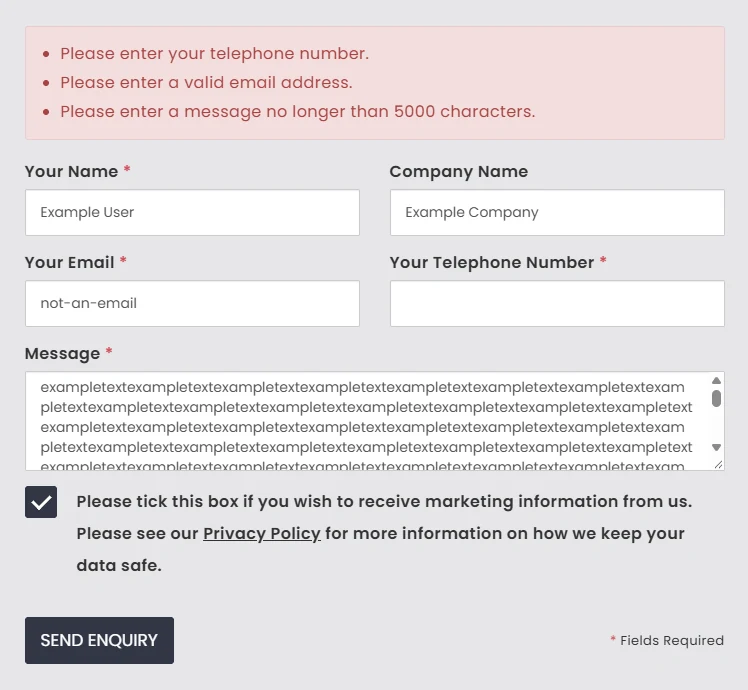
See how PHP checks enquiries submitted through my Netmatters contact form.
// Values have already been checked as strings and trimmed.
// $errors also contains any errors from those type checks.

$fieldValues = [
    'name' => $name,
    'email' => $email,
    'telephone' => $telephone,
    'message' => $message,
];

$requiredFields = [
    'name' => 'Please enter your name.',
    'email' => 'Please enter your email address.',
    'telephone' => 'Please enter your telephone number.',
    'message' => 'Please enter your message.',
];

foreach ($requiredFields as $field => $errorMessage) {
    if ($fieldValues[$field] === '' && !isset($errors[$field])) {
        $errors[$field] = $errorMessage;
    }
}

if ($email !== '') {
    $result = filter_var($email, FILTER_VALIDATE_EMAIL);

    if ($result === false) {
        $errors['email'] = 'Please enter a valid email address.';
    }
}
Language Used
PHP
What It Does
Checks required fields and validates the email format. Errors are collected in an array and displayed above the form, while entered values are kept so visitors can correct their submission.
Why I've Used It
JavaScript gives visitors immediate feedback, but it can be disabled or bypassed. I added PHP validation so enquiries are checked on the server before being saved to the database.